Browser extension for Chrome and Edge
Show All Data, SOQL and AI, right inside Salesforce
AISOQL for Salesforce adds developer and admin tools to the org pages you already work in, and connects them to AISOQL's AI. See and edit every field, run and write SOQL, find any automation, and pull a flow or class straight into the Code Generator.
Free with an AISOQL account. Works in Google Chrome and Microsoft Edge. Uses your existing Salesforce login and permissions, and changes data only when you edit a field and click Save.

Everything in one panel
Open it from the AISOQL tab on the right edge of any Salesforce page, or press Ctrl+Shift+K.
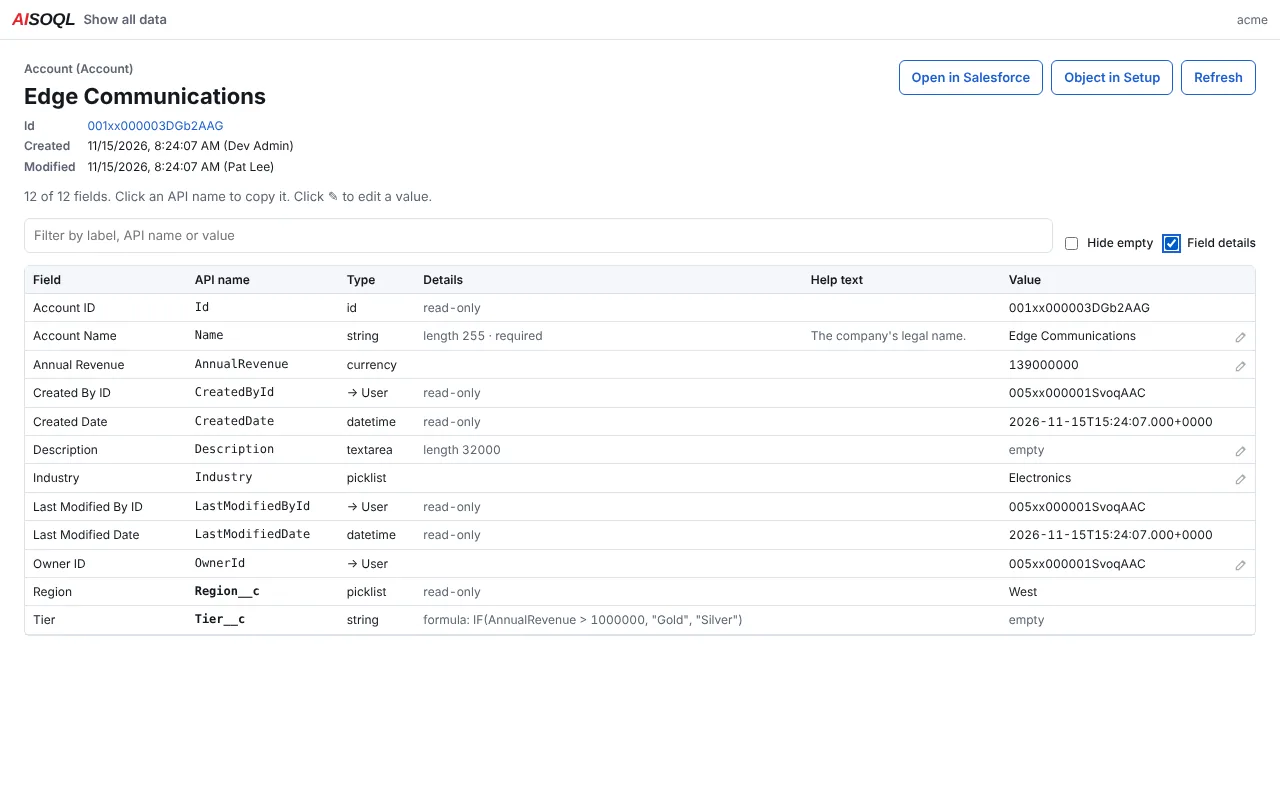
Show All Data
A card for the record on screen and every field with its label, API name, type and value. Open it full screen, see field details and formulas, and click an API name to copy it.
Edit in place
Change a value right in the list when your Salesforce permissions allow it. Salesforce's validation rules still apply, and nothing saves until you click Save.
Automation lookup
Find flows, validation rules, Apex triggers and classes, formula fields, workflow rules, Process Builder, approval processes, LWC, Aura and Visualforce, by object and type.
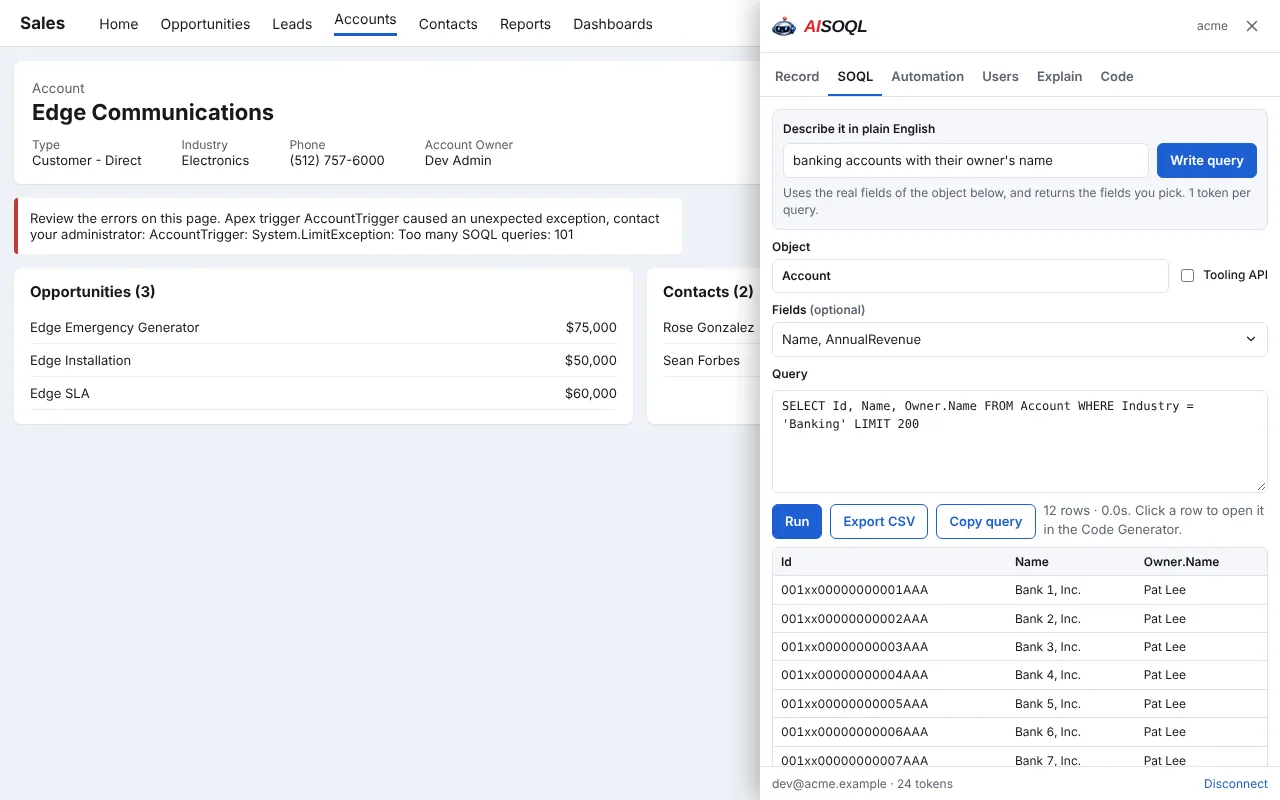
SOQL runner
Run SOQL and Tooling API queries, see results in a table, export to CSV, and pick fields from a list to build the query.
Users
Find users by name, profile or role. Admins can use Salesforce's own Log in as, after confirming.
Write the query for me
Describe what you need in plain English and AISOQL writes the SOQL from your object's real fields.
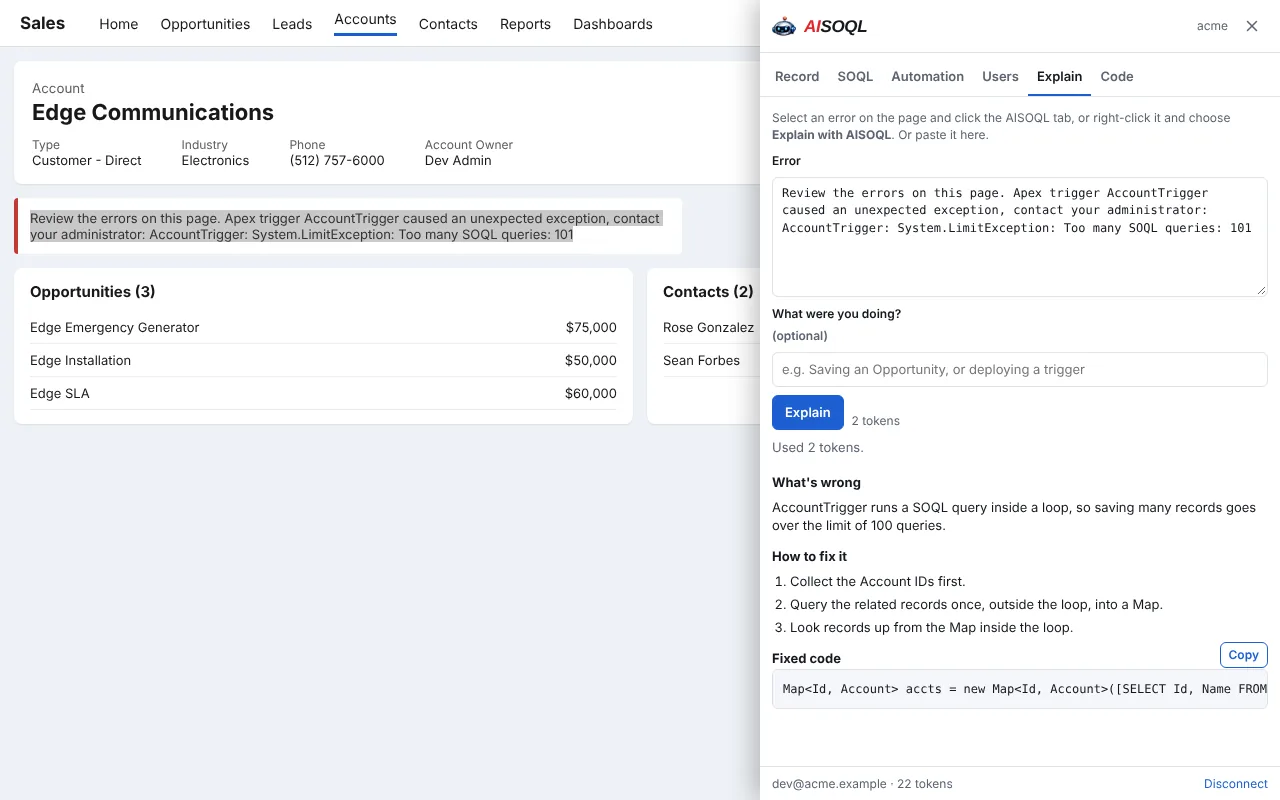
Explain this error
Select an error on the page, or right-click it, and get the cause, the fix and corrected code.
Pull into AISOQL
Send a flow, Apex class, trigger, validation rule or query row to the Code Generator in one click, ready to change, fix or rebuild.
From Flow Builder to the Code Generator in one click
Open a flow in Flow Builder, an Apex class in Setup or a validation rule, and the panel shows what's on the page with a Pull into AISOQL button. It sends the flow's definition as Metadata API XML, or the class, trigger or formula, to the Code Generator with the right component type already picked.
- Rebuild retired workflow rules and Process Builder processes as record-triggered flows.
- Convert Aura components to Lightning Web Components.
- Fix a failing trigger with its real code in front of the AI, not a description of it.

Set up in two minutes
Add it to your browser
Install from the Chrome Web Store. Microsoft Edge installs from the same listing.
Connect your account
In AISOQL, open Settings › Browser extension, get a one-time code and type it into the extension.
Open any Salesforce page
Click the AISOQL tab on the right edge, or press Ctrl+Shift+K. Your Salesforce login is used as is; there's nothing to set up in your org.
See it in action
Built for orgs with real data
Your session stays in your browser
The extension uses the Salesforce login you already have and sends it only to your org's own Salesforce domain. It's never sent to AISOQL or stored.
Your data stays between you and Salesforce
Records and query results go straight from Salesforce to your browser. Only what you choose to send to an AI action or the Code Generator reaches AISOQL.
Salesforce's permissions decide
You see and change only what your Salesforce user can. Edits save one field at a time, only when you click Save, with validation rules applied.
For security teams: how the extension works and what it can access, and the privacy policy.
Frequently asked questions
Is the extension free?
Yes. Show All Data, editing, the SOQL runner, automation lookup, Users and Pull into AISOQL are free with a free AISOQL account. The AI actions use tokens: writing a query costs 1 token and explaining an error costs 2. Teams that use their own Anthropic API key pay no tokens.
Does it work in Microsoft Edge?
Yes. Edge installs extensions from the Chrome Web Store: open the listing in Edge, choose Allow extensions from other stores if Edge asks, then click Get.
What does it need from my Salesforce org?
Nothing to install or configure. It uses the Salesforce session of the tab you're logged into, the same way Salesforce Inspector does, and calls your org's REST API as you. Orgs that turn on Salesforce's API Access Control block it, as they block any app that isn't on their approved list.
Does my Salesforce data go to AISOQL?
No, not on its own. Records, query results and user lists go straight from Salesforce to your browser. AISOQL only receives what you choose to send: the text you type or select for an AI action, an object's field names, and a query row or automation you send to the Code Generator.
Can it change my data?
Only when you edit a field and click Save, and only where your Salesforce permissions allow it. It never creates or deletes records and never changes metadata or settings.
Does it work in sandboxes and production?
Both, plus scratch orgs and Developer Edition orgs. It works on your org's My Domain address in Lightning, Setup and Salesforce Classic.
How is it different from Salesforce Inspector?
It covers the same everyday tools, like Show All Data and a SOQL runner, and adds AISOQL's AI: queries written from plain English, errors explained with corrected code, and one click to send a flow, class or rule to the Code Generator.
Bring AISOQL into your Salesforce org
AISOQL is an independent product and is not affiliated with, sponsored by or endorsed by Salesforce, Inc.